Lab 2: Linux Command Line
TA: Diego Llanes
What is the lab about?
Expected Outcomes
- basic familiarity with the command line
- knowing what the command line is used for
- how to interact with python from a shell
Basic Commands
There are a few basic commands that you are going to need to know to interact with a Linux machine.
pwd: print working directoryls: list filescd: change directorymkdir: make directorytouch: create a new filepython: a python interpreter
Where are we???
the basic usage of the pwd command always just pwd (print working directory)
when you type this into your shell you should see print out of what directory we are in, if we just started this shell, it's probably your home directory: /home/USERNAME
you may be thinking to yourself, "okay that's great, but what is a directory???"
Where are we??? (cont.)
a directory is effectively a synonym for "folder", what's important to know about directories is that they are just places that we put files.
							$ ls
							file1.txt file2.py dir1 dir2
							$ ls dir1
							super_secrets.md awesome_picture.png
Finding Files
the basic usage of the ls command is simply ls (list files)
when you type this into your shell you should see all the files available to you from that directory
We can also pass this command other directories to see what's inside them!
							$ ls
							file1.txt file2.py dir1 dir2
							$ ls dir1
							super_secrets.md awesome_picture.png
Finding Files (cont.)
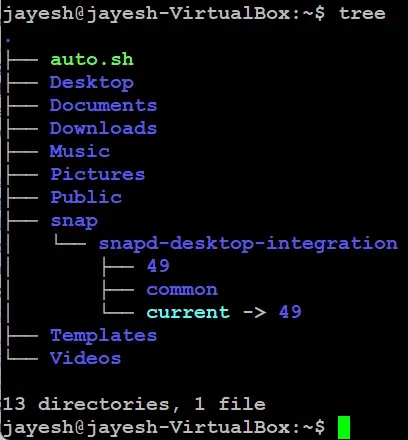
pro-tip: if you like a more graphical approach, check out the tree command
Navigation
The basic usage of the cd (change directory) command is:
cd directory1/directory2
Now that we know where we are and how what files and directories are available to us, let's put it all together and move around!
Navigation (cont.)
							$ pwd
							/home/USERNAME
Navigation (cont.)
							$ pwd
							/home/USERNAME
							$ ls
							file1.txt file2.py dir1 dir2
Navigation (cont.)
							$ pwd
							/home/USERNAME
							$ ls
							file1.txt file2.py dir1 dir2
							$ cd dir1
Navigation (cont.)
							$ pwd
							/home/USERNAME
							$ ls
							file1.txt file2.py dir1 dir2
							$ cd dir1
							$ ls
							super_secrets.md awesome_picture.png
Navigation (cont.)
							$ pwd
							/home/USERNAME
							$ ls
							file1.txt file2.py dir1 dir2
							$ cd dir1
							$ ls
							super_secrets.md awesome_picture.png
							$ pwd
							/home/USERNAME/dir1
Making Files and Directories (cont.)
our two ways of making new stuff are:
- touch: to make new files
- mkdir: to make new directories
Making Files and Directories (cont.)
							$ ls
							file1.txt file2.py dir1 dir2
							$ mkdir homework_folder
Making Files and Directories (cont.)
							$ ls
							file1.txt file2.py dir1 dir2
							$ mkdir homework_folder
							$ ls
							file1.txt file2.py dir1 dir2 homework_folder
Making Files and Directories (cont.)
							$ ls
							file1.txt file2.py dir1 dir2
							$ mkdir homework_folder
							$ ls
							file1.txt file2.py dir1 dir2 homework_folder
							$ cd homework_folder
Making Files and Directories (cont.)
							$ ls
							file1.txt file2.py dir1 dir2
							$ mkdir homework_folder
							$ ls
							file1.txt file2.py dir1 dir2 homework_folder
							$ cd homework_folder
							$ touch hw1.py
Making Files and Directories (cont.)
							$ ls
							file1.txt file2.py dir1 dir2
							$ mkdir homework_folder
							$ ls
							file1.txt file2.py dir1 dir2 homework_folder
							$ cd homework_folder
							$ touch hw1.py
							$ pwd
							/home/USERNAME/homework_folder
Making Files and Directories (cont.)
							$ ls
							file1.txt file2.py dir1 dir2
							$ mkdir homework_folder
							$ ls
							file1.txt file2.py dir1 dir2 homework_folder
							$ cd homework_folder
							$ touch hw1.py
							$ pwd
							/home/USERNAME/homework_folder
							$ ls
							hw1.py
Using Python In The CLI
Now that we know how to move around in the terminal and start being productive with it, we need to learn how to use Python!
the basic usage is as follows:
python: to start a live interpreterpython file.py: to execute a saved program
Using Python In The CLI (interpreter)
							$ python
							>>>
Using Python In The CLI (interpreter)
							$ python
							>>> print("hello world!")
							hello world!
							>>>
Using Python In The CLI (interpreter)
							$ python
							>>> print("hello world!")
							hello world!
							>>> 21 * 0.2
							4.2
							>>>
Using Python In The CLI (interpreter)
							$ python
							>>> print("hello world!")
							hello world!
							>>> 21 * 0.2
							4.2
							>>> exit()
Using Python In The CLI (from files)
							# the `cat` command will print the contents of a file
							$ cat file.py
Using Python In The CLI (from files)
							# the `cat` command will print the contents of a file
							$ cat file.py
							print("this is from a saved file!")
Using Python In The CLI (from files)
							# the `cat` command will print the contents of a file
							$ cat file.py
							print("this is from a saved file!")
							$ python file.py
							this is from a saved file!
Overwhelming
if you are feeling a little overwhelmed right now, don't worry, it is a lot of new information
please ask questions, I am here to help guide, this is a lot, I get it
also please talk the people next to you, collaborate and help eachother!